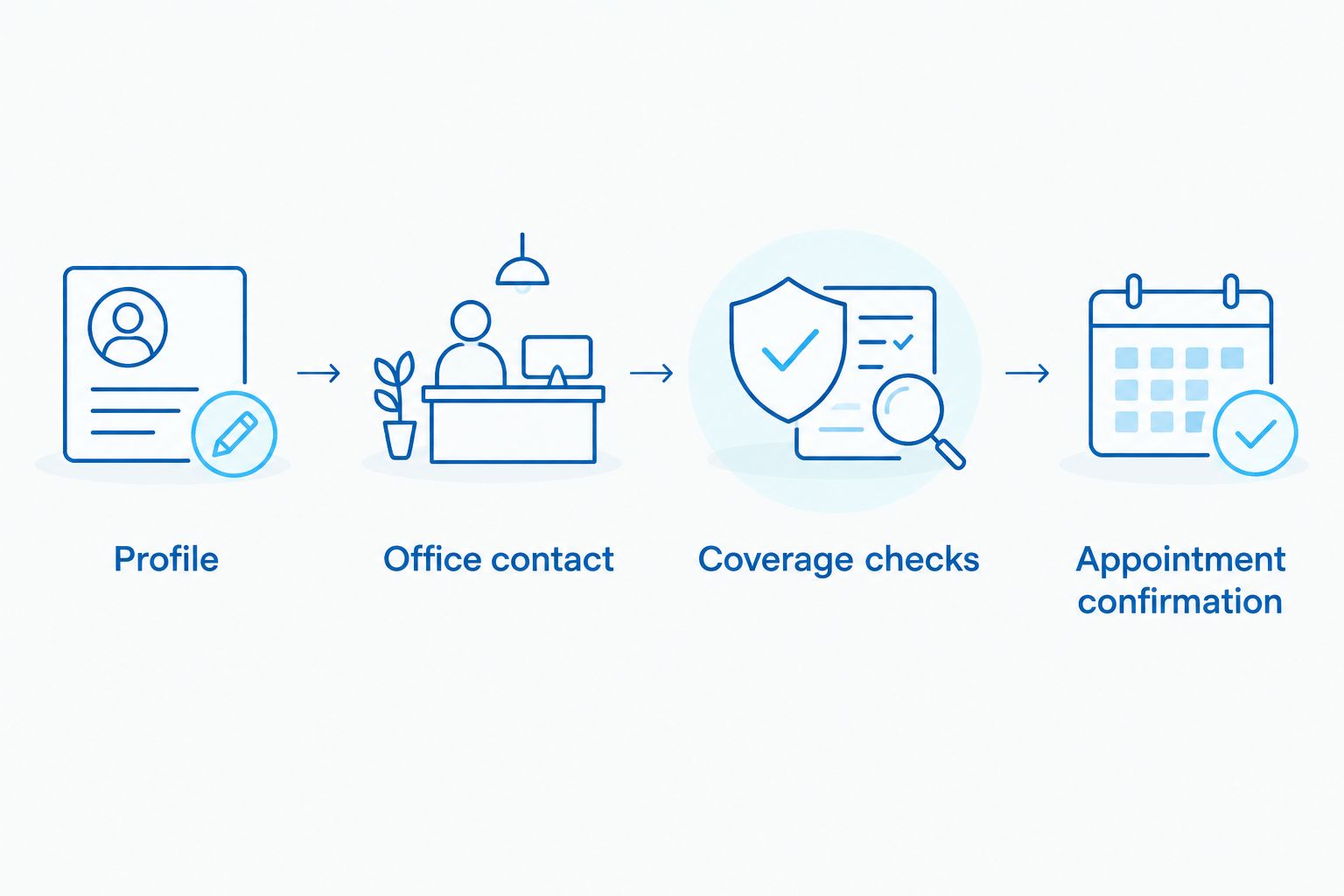
Instead of repeatedly checking Healthgrades dentist reviews and wondering what to do next, use a review-to-booking checklist: verify the dentist and location, contact the office, and confirm the visit details. This 2026 workflow takes you from a promising profile to a confirmed new-patient appointment without treating a review score or an appointment request as a booking.
TL;DR
Use Healthgrades dentist reviews to shortlist a dentist, then verify location, services, and appointment details directly.
Affordable Dentist Near Me provides general, cosmetic, and restorative dental care for families across six Texas cities.
A submitted appointment request is not a confirmed new-patient visit.
Keep insurance information and medical details out of public reviews.
Why this matters
A review helps you decide whom to contact. It does not establish whether a particular dentist practices at your preferred location, whether your insurance applies, or what your first appointment will include.
Affordable Dentist Near Me is a fit for families seeking general, cosmetic, and restorative dental care in its Texas service cities. Those cities are Fort Worth, Dallas, Houston, Waco, Grand Prairie, and Crowley. The practice's geographic reach does not mean every dentist or service is offered at every office; confirm the match before scheduling.
Start with the Affordable Dentist Near Me website when checking practice information against a directory profile. For your 2026 search, the goal is a clear handoff from research to the correct office—not more time spent comparing stars.
Before you start
Gather the profile details. Keep the dentist's full name, listed office address, and your reason for seeking care together. You can read reviews without setting up an automated connection between Healthgrades and a dental office.
Prepare your contact and coverage information. Have your preferred callback number, scheduling preferences, and insurance card ready if you have coverage. Share sensitive information only through a channel the office identifies as appropriate.
Check the location before requesting a visit. A dentist's name and a practice name are not enough to identify the correct office. Match the street address, and ask whether the named dentist sees new patients there.
The workflow below uses a personal checklist, not a claimed Healthgrades integration. Bold labels such as Office address are suggested fields for your notes; they are not Healthgrades buttons or menu names. Follow the labels actually displayed on the page you use rather than expecting a particular booking button.
Profile and location checklist
Verify the dentist you intend to see
Record Dentist name exactly as it appears on the profile. Keep the individual dentist separate from the practice name so you can ask about the right person.
Record Office address, including the city. Compare it with the office information you obtain directly from the practice.
Add Visit reason in plain language, such as a new-patient exam, a broken tooth, or a discussion about replacing a missing tooth. Do not choose a treatment solely because a reviewer describes receiving it.
Read the written reviews for details relevant to your visit: explanations, communication, comfort, and scheduling. Separate those experiences from claims about what treatment you personally need.
Add Questions to verify whenever a review raises an issue that matters to you. Ask the office directly rather than assuming another patient's experience describes your appointment.
Expected result: You have 3 identity details—dentist name, office address, and visit reason—plus a short list of questions. You can now contact a specific office instead of making a general inquiry that needs rerouting.
Read reviews without turning them into guarantees
Healthgrades dentist reviews describe individual experiences. They are not a diagnosis, a statement of your insurance benefits, or a promise that your visit will follow the same course.
For a 2026 appointment, give time-sensitive statements an extra check. A review discussing an office's past scheduling experience does not confirm the process you will use now.
Look for useful detail rather than deciding from praise or criticism alone. A comment about clear explanations gives you a question to ask: how will the dentist explain findings and treatment choices? It does not prove the outcome of your own care.
Keep the clinical decision separate from the review decision. Reviews can help you choose whom to contact; the dentist's assessment guides treatment recommendations.
Office contact and request details
Choose the contact route that fits your question
You do not need to keep the entire booking process inside a review directory. Contact the office through a route you can verify, then establish what must happen before the appointment is confirmed.
Contact route
Best for
Advantage
Limitation
Phone conversation
Questions about the dentist, location, symptoms, or coverage
Lets you clarify several details in the same conversation
You still need a clear record of the agreed appointment details
Online appointment request, if offered
Sending scheduling preferences when a live conversation is inconvenient
Lets you submit your preferred contact details and visit reason
Submission alone does not confirm a booked visit
These are contact methods, not claims that a particular Healthgrades profile or practice offers both. Use the route the office actually provides.
Find the practice's direct contact information through its own published materials. Confirm that it belongs to the intended location before sharing personal details.
State Requested dentist, Preferred location, and Visit reason at the beginning of the conversation or request. If you are flexible about the dentist, say so explicitly.
Ask whether the first visit is an evaluation, a cleaning appointment, or another type of visit. Do not assume a requested procedure will happen at the initial appointment.
Provide your scheduling preferences and the contact method you want the office to use. Ask what response or confirmation you should expect.
Record Request status as either pending or confirmed based on what the office actually tells you.
Expected result: The office has enough information to handle your request, and you know whether another response is needed. You have not mistaken an acknowledgment for a reservation.
For care with Affordable Dentist Near Me, review the dental services before contacting the office. The practice provides general, cosmetic, and restorative dental care, but your location and first-visit needs still require confirmation.
Coverage checks and appointment confirmation
Resolve the questions that can derail check-in
An insurance logo or another patient's insurance experience does not establish your benefits. Ask about your specific plan and the dentist who will see you; a statement that an office accepts insurance is not the same as confirmation of in-network status.
Ask Coverage status questions using the plan name on your card. If network status matters to your decision, check it with both the office and your insurer.
Ask what the office needs before the visit. Provide records, forms, or insurance information through the method the office requests rather than sending medical details through a public review platform.
Confirm Visit type and ask whether any requested treatment requires a separate evaluation. Keep an exam, a treatment discussion, and a procedure distinct in your notes.
Request the 4 appointment details that complete the handoff: Date, Time, Office address, and Dentist or care team.
Save the confirmation and any arrival instructions together. Ask the office to clarify discrepancies before you travel.
Expected result: Your appointment record identifies when to arrive, where to go, who you are scheduled with, and what the visit is intended to cover. Any unanswered coverage questions remain visible rather than being treated as settled.
This 2026 booking checklist is a suggested way to organize information, not a statement of a practice's internal scheduling rules. Follow the office's instructions when they differ from your personal notes.
A review starts the search; direct office confirmation completes the booking.
The final handoff is the point to act. Once you have identified your preferred location and visit reason, contact Affordable Dentist Near Me to clarify the next step rather than continuing to compare unrelated reviews.
Confirm your next step
Contact the office about your preferred location, visit reason, and appointment details.
A second useful workflow starts when you notice different information after submitting a request. Examples include a different address, uncertainty about the named dentist, or a change in your preferred appointment day.
Update the existing request before starting another one. Keeping the correction with the original request makes it easier to explain what changed.
Open your saved notes and identify the exact detail that needs correction. Distinguish information you saw online from information the office confirmed directly.
Contact the office using the verified route. Give your name and enough appointment context for staff to locate the request through their normal process.
Explain the change and ask whether the original request or appointment remains active. Do not assume a new inquiry cancels the earlier one.
Save the revised confirmation and mark the superseded details as outdated. Keep one current appointment record.
Expected result: You know whether the appointment changed, stayed in place, or still needs confirmation. A profile edit alone is not an instruction from the office to change your plans.
For the rest of 2026, repeat this check when your own scheduling needs change. You do not need to reread every review to correct an address or appointment time.
Troubleshooting
The profile address and office information do not match
Stop before traveling or sharing detailed intake information. Ask the practice which location is associated with the dentist you requested, then update your notes using the directly confirmed address.
You sent a request but have no appointment confirmation
Treat the request as pending. Contact the office and ask whether a date and time have been assigned; do not arrive assuming submission reserved a visit.
The office accepts your insurer, but network status is unclear
Ask about the exact plan and scheduled dentist, then verify with your insurer. Do not treat general acceptance language as a statement about your benefits or personal responsibility.
A review makes you worried about a particular treatment
Turn the concern into a question for the dentist. Ask why the treatment is being considered, what alternatives need discussion, and what the evaluation must establish before you decide.
You need help for symptoms, not a routine booking
Describe your symptoms directly to the office rather than using reviews to judge urgency. Trouble breathing or swallowing, or severe swelling affecting breathing, requires emergency medical attention; do not wait for an online appointment response.
Customize your workflow
Keep a reusable note with your preferred location, scheduling constraints, accessibility needs, and questions about dental anxiety. Share only what is relevant, through the office's appropriate intake process.
For a family, maintain separate appointment details for each person. Confirm who is scheduled and the purpose of each visit rather than assuming one request covers the household.
For a cost-conscious search, prepare questions about coverage, the proposed visit, and how treatment recommendations will be explained. Do not use a favorable review as a substitute for a personal treatment discussion. Affordable Dentist Near Me serves families seeking dental care, but reviews cannot establish an individual's treatment needs or insurance benefits.
FAQ
How do I use Healthgrades dentist reviews to book a first visit?
Use Healthgrades dentist reviews to identify a dentist, then verify the office location and contact the practice. Treat the visit as booked only after the office confirms the appointment details.
Does sending an appointment request mean I have a booking?
No, sending an appointment request does not by itself establish a confirmed booking. Ask the office to confirm the date, time, location, and scheduled dentist or care team.
Should I choose a dentist only by the review score?
No, a review score alone does not establish whether a dentist meets your needs. Verify the location, relevant services, coverage questions, and first-visit arrangements directly.
Can Healthgrades reviews tell me whether my dental insurance is accepted?
Reviews cannot verify your personal dental benefits. Check your exact plan with the office and your insurer, including network status for the dentist you are scheduled to see.
What should I ask before my first dental appointment?
Ask what the visit includes, which office you should attend, and what information you need to provide beforehand. Also clarify coverage questions and whether a requested procedure requires a separate evaluation.
What if the dentist’s profile lists a different address?
Confirm the correct address directly with the practice before traveling. Ask whether the named dentist sees patients at your preferred location and save the confirmed details.
Can I put medical or insurance information in a review?
Keep medical and insurance information out of public reviews. Share information needed for care through the intake method the dental office identifies as appropriate.
One last thing
The most useful final check is the address, not another review. Before leaving for your 2026 appointment, compare your saved confirmation with your destination and check that the visit is actually confirmed. Reviews help you choose; a clear appointment record tells you where to go.