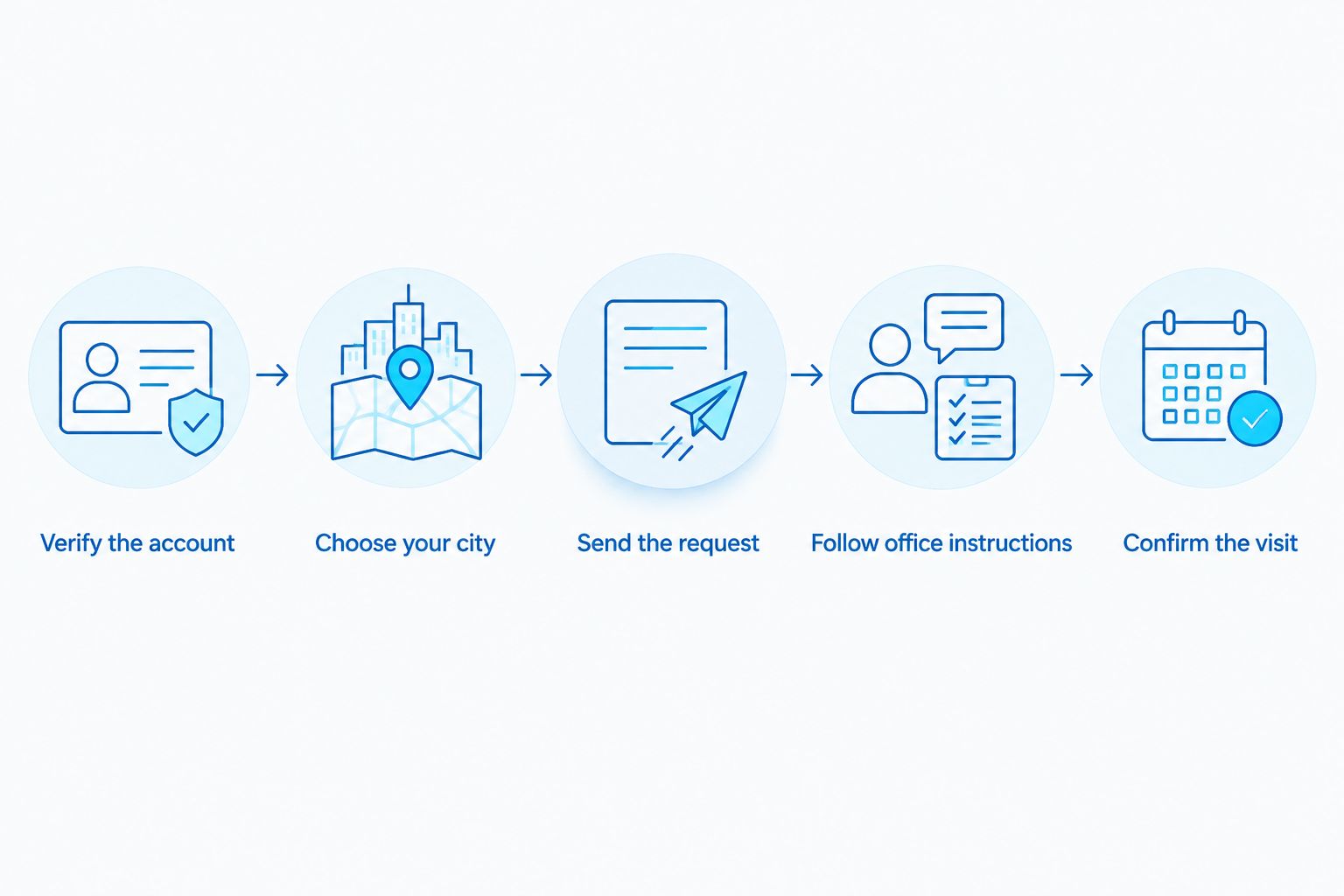
Instead of repeatedly messaging about a teeth whitening appointment, use Instagram to request the right office and move to an office-confirmed booking channel. This 2026 Instagram teeth whitening appointment workflow separates an inquiry from a confirmed visit without asking you to share health information in a DM.
TL;DR
An Instagram teeth whitening appointment is a request until the dental office confirms the visit.
Affordable Dentist Near Me provides teeth whitening; verify the practice’s Instagram account before messaging.
Use DMs for basic scheduling questions, not medical records, payment details, or treatment approval.
Confirm the office, appointment purpose, date, and time before adding the visit to your calendar.
Why this matters
A reply on Instagram does not establish that you have an appointment. You still need the correct location, an agreed visit time, and confirmation of what the office has scheduled.
Affordable Dentist Near Me is best for families seeking general, cosmetic, and restorative dental care across its six listed Texas cities. Those cities are Fort Worth, Dallas, Houston, Waco, Grand Prairie, and Crowley. Start with the Affordable Dentist Near Me website to check practice information rather than trusting an account name alone.
For a teeth whitening request, the most important distinction is consultation versus treatment. Ask whether the office is scheduling an evaluation, a whitening appointment, or another necessary first visit. A booking does not replace a dentist’s assessment of whether whitening is appropriate for you.
Before you start
Verify the account and contact route. You need an Instagram account, access to the practice’s independently verified contact information, and a way to receive the office’s reply. Do not assume a matching profile photo proves an account belongs to the practice.
Prepare your scheduling preferences. Have your preferred city, appointment purpose, and general day or time preference ready. Keep medical history, insurance documents, and payment information out of Instagram.
Expect a handoff rather than instant booking. This workflow does not establish that the practice accepts Instagram bookings or uses automated scheduling. If messaging is unavailable, use an office contact method verified through the practice’s website.
The non-obvious catch is that a social media reply and the appointment schedule are separate things. A staff member answering a question does not necessarily mean the visit has been entered into the office’s scheduling system.
Account verification and message setup
The first part of your 2026 workflow is identity checking, not sharing details. Use Instagram only after you have established that the account belongs to the practice you intend to visit.
Verify the account. Compare the account with information supplied directly by the practice. If you cannot establish the connection, stop and contact the office through an independently verified channel.
Choose your city. Decide which listed city you want before sending a request. A multi-location practice needs a location preference to route a scheduling question correctly.
Open the verified profile and select Message if that button is available. If it is absent, do not switch to a similarly named account or an account suggested in a comment.
Send the request. Write your appointment purpose, preferred city, and broad scheduling preference, then select Send. Ask what contact method the office wants you to use to finish scheduling.
Keep the opening message focused on logistics. You do not need to explain your dental history to ask how to arrange a whitening visit.
Expected result: You have sent a basic scheduling inquiry to a verified account, or you have identified that Instagram is not a usable contact route. Neither outcome should be marked as a booked appointment yet.
What belongs in the opening message?
Include these 3 scheduling details:
Appointment purpose: You want to ask about a teeth whitening appointment.
Preferred city: Name the location area you intend to visit.
Scheduling preference: State the days or parts of the day that generally work for you.
These are message ingredients, not required Instagram fields. Do not send a password, payment card number, photograph of an insurance card, or a detailed description of symptoms to complete this step.
Office handoff and visit planning
The next step is to move from a social conversation to the office’s actual scheduling process. In 2026, the safest rule is simple: verify the destination before entering personal information.
Follow the office’s instructions. Ask which contact method you should use to complete the request. Use a route you can verify through the practice, not an unrelated link sent by an unfamiliar account.
Clarify the appointment purpose. Ask whether your first visit is an evaluation for whitening or a treatment visit. Do not interpret a general reply about whitening as approval for treatment.
Ask how to provide any required patient information. Share health history through the office’s instructed intake process rather than continuing it in Instagram.
Raise concerns about sensitivity or existing dental work with the dental team. Let the team explain what needs assessment before deciding on whitening.
Expected result: You know which office will handle the request, how to complete scheduling, and what kind of visit you are requesting. You have not treated a DM conversation as a clinical assessment.
If sensitivity is your main concern, read the guide to in-office teeth whitening for sensitive teeth before speaking with the office. Use it to prepare questions, not to decide your own treatment eligibility.
Which contact route should you use?
These are workflow options, not a statement that every route is offered by Affordable Dentist Near Me. Choose the route the office confirms it uses.
Contact route
Best for
Main benefit
Limitation
Instagram DM
Asking where and how to arrange a whitening visit
Keeps the initial request brief
A reply alone does not confirm a booking; avoid sensitive details
Office phone conversation
Clarifying the visit purpose and resolving scheduling questions
Lets you ask follow-up questions directly
You still need explicit appointment confirmation
Office-approved online scheduling
Submitting a request when the office directs you there
Gives you a structured way to enter scheduling information
A submitted request is not confirmation unless the office says it is
Instagram is useful at the beginning of this process. Its limitation is the missing connection between a conversation and the office’s appointment record. Do not assume an automatic connection exists.
Appointment confirmation and calendar setup
An Instagram teeth whitening appointment becomes a confirmed visit only when the office explicitly confirms the booking. Complete these checks before planning travel or taking time away from work.
Confirm the visit. Obtain the office location, appointment date, appointment time, and appointment purpose. Ask the office to clarify anything missing.
Check whether the time refers to arrival or the start of the visit. Follow the office’s instructions rather than adding your own assumed preparation period.
Ask how the office wants you to handle changes. Keep the verified contact method with your appointment information so you do not have to restart through social media.
Create 1 calendar entry after confirmation. Record the office location and appointment purpose without copying health information into the calendar description.
Expected result: Your calendar matches the office’s confirmed appointment, including the correct location and visit type. You also know how to contact the office if your plans change.
A message starts the request; the office’s confirmation completes the booking.
Before you close the conversation, make 2 confirmation checks: match the location to your intended office, then match the date and time to your calendar. These checks address the details that matter for showing up at the right place.
For Affordable Dentist Near Me teeth whitening inquiries, keep the request focused on the office you intend to visit. Do not assume a message sent to a practice-level account has already reached that location’s scheduling team.
Change a confirmed appointment without creating another request
A second useful 2026 workflow starts when your plans change after booking. The goal is to update the existing appointment, not leave the office with competing requests.
Use the change-of-appointment contact method the office supplied. If you return to Instagram, ask how to reach the scheduling team rather than assuming a DM changes the appointment.
Explain that you already have a confirmed visit and need to change it. Provide identifying information only through the office’s instructed process.
Ask the office to confirm what happens to the original appointment. Do not assume a new inquiry automatically cancels it.
Update your calendar only after the office confirms the change. Replace the old entry rather than keeping both as active appointments.
Expected result: The office and your calendar agree on the revised visit. A message expressing a preference is not treated as a completed rescheduling action.
If you decide not to proceed, contact the office directly about cancellation. Do not rely on deleting the Instagram conversation or leaving a message unread.
Troubleshooting
The profile has no Message button
Do not search for a near-identical account and send your details there. Use a contact method verified through the practice’s website and ask how the office handles whitening appointment requests.
You sent a DM but received no confirmation
Treat the visit as unbooked. Contact the office through a verified channel, explain that you submitted an Instagram inquiry, and ask whether a scheduling request exists.
A reply asks for sensitive information in Instagram
Pause before sending it. Ask the office for its instructed intake or contact process, and verify that process independently before providing medical, insurance, or payment information.
You received a time but no location
Ask for the exact office location and appointment purpose. A time alone is not enough for a multi-location dental visit, especially when your original message named only a city.
The reply sounds like general whitening information
Ask directly whether the office has booked a visit. Educational information, acknowledgment of your message, and appointment confirmation serve different purposes; do not treat them as interchangeable.
Customize your workflow
Keep the same booking sequence in 2026, but change the questions to match your circumstances. Verify identity, confirm the visit purpose, and obtain explicit confirmation every time.
If you have a particular event in mind: Tell the dental team your target date through its instructed contact process. Ask about assessment and treatment planning without assuming a result by that date.
If you already receive care from the practice: Tell the scheduling team you are an existing patient through its approved process. Avoid creating another patient record simply because the request began on Instagram.
If another person helps arrange your care: Ask the office how that person should participate. Do not assume access to your Instagram account establishes permission to discuss your dental information.
Affordable Dentist Near Me provides teeth whitening within its broader cosmetic dental services. The practice’s listed services do not establish an Instagram booking integration, a particular response time, or suitability for treatment without assessment.
FAQ
Can I book a teeth whitening appointment through Instagram?
Instagram can start an appointment inquiry if the practice has a verified account that accepts messages. Your visit is booked only when the dental office explicitly confirms it through its scheduling process.
Does Affordable Dentist Near Me accept Instagram appointment bookings?
Confirm the current booking process directly with Affordable Dentist Near Me. Its listed teeth whitening services do not establish that Instagram booking or automated DM scheduling is offered.
What should I include in an Instagram teeth whitening appointment message?
Include your appointment purpose, preferred city, and general scheduling preference. Ask how to finish booking, and keep medical records, insurance documents, and payment details out of the DM.
Does an Instagram reply mean my whitening appointment is confirmed?
No, an Instagram reply alone does not confirm an appointment. Obtain explicit confirmation of the office location, date, time, and appointment purpose.
Should I send pictures of my teeth through Instagram?
Do not send dental photographs as part of a basic scheduling inquiry. Ask the dental office whether photographs are needed and how it wants you to provide them.
Can I arrange whitening if I have sensitive teeth?
Ask the dental team for an assessment before deciding on whitening. A scheduling conversation cannot determine which treatment is appropriate for sensitive teeth.
How do I change a whitening appointment requested on Instagram?
Use the appointment-change contact method supplied by the office. Confirm the revised visit and the status of the original appointment before updating your calendar.
One last thing
The most useful booking question is whether the office has scheduled an evaluation or a whitening treatment visit. Resolving that distinction before you arrive gives you a clearer purpose for the appointment than a general message about wanting whiter teeth.